Saturday, December 6, 2014

Javascript Cookie Script

Here's a basic Javascript cookie script, it's from the public domain one, unfortunately we can't remember it's source, if anyone knows it, we'll add that to the script header. This code is provided as is, but has been tested extensively over the years, and should work quite well for you. If you do manage to find a bug in it, please post it in our web scripting forum.

Your Computer

Javascript

JavaScript is enabled.

Cookies

Cookies are enabled

How to determine if Cookies are enabled with Javascript

Go to this page to learn how to check if cookies are enabled with Javascript. It's a quick, easy test, which you can run on every page through a library file.
We've been using this script a long time, it works fine, nothing really needs to be changed on it. Note, the way we use it, it's set to make the cookie last in days, that can easily be changed however.
Directions on how to use the Javascript Cookie Script
Download: Javascript Cookie Script
Current Version: 1.1.2
File Last Modified: November 05, 2009. 14:31:38 pm
You really don't need much knowledge to use this script, it's pretty much plug and play, but we'll explain it's main part and how to use them anyway. If you have specific questions, please post them in ourJavascript Forum and we will answer them there.
Set Cookie Javascript Function
You need to put the name and values in quotes when you call the function, like this:
Set_Cookie( 'mycookie', 'visited 9 times', 30, '/', '', '' );. Don't forget to put in empty quotes for the unused parameters or you'll get an error when you run the code. This makes the cookie named 'mycookie', with the value of 'visited 9 times', and with a life of 30 days, and the cookie is set to your root folder.
The Set_Cookie values for 'domain' and 'secure' are not utilized. Use 'domain' on the Javascript cookie if you are using it on a subdomain, like widgets.yoursite.com, where the cookie is set on the widgets subdomain, but you need it to be accessible over the whole yoursite.com domain.
It's good practice to not assume the path to the site root will be set the way you want it by default, so do this manually as a rule, '/'. If no value is set for expires, it will only last as long as the current session of the visitor, and will be automatically deleted when they close their browser.
function Set_Cookie( name, value, expires, path, domain, secure )
{
// set time, it's in milliseconds
var today = new Date();
today.setTime( today.getTime() );

/*
if the expires variable is set, make the correct
expires time, the current script below will set
it for x number of days, to make it for hours,
delete * 24, for minutes, delete * 60 * 24
*/
if ( expires )
{
expires = expires * 1000 * 60 * 60 * 24;
}
var expires_date = new Date( today.getTime() + (expires) );

document.cookie = name + "=" +escape( value ) +
( ( expires ) ? ";expires=" + expires_date.toGMTString() : "" ) +
( ( path ) ? ";path=" + path : "" ) +
( ( domain ) ? ";domain=" + domain : "" ) +
( ( secure ) ? ";secure" : "" );
}
   
This will set the cookie. It's the most complicated part, but actually for most purposes all you need to set are the first 4 parameters, name, value, expires, and path. If you want the cookie available only in one folder, you will need to add '/folder_name/' as a path variable, that tells the script to set the cookie for the just that path, not for the whole domain.
As a good general rule, set the path to '/', the root of your website. Generally 'domain' and 'secure' are not something you will be needing to use unless you set the cookie on a subdomain, in which case you may want to set the domain to your primary domain if you want it to be accessible from the main domain, or other subdomains.
Get Cookie Javascript Function
// this fixes an issue with the old method, ambiguous values
// with this test document.cookie.indexOf( name + "=" );
function Get_Cookie( check_name ) {
 // first we'll split this cookie up into name/value pairs
 // note: document.cookie only returns name=value, not the other components
 var a_all_cookies = document.cookie.split( ';' );
 var a_temp_cookie = '';
 var cookie_name = '';
 var cookie_value = '';
 var b_cookie_found = false; // set boolean t/f default f

 for ( i = 0; i < a_all_cookies.length; i++ )
 {
  // now we'll split apart each name=value pair
  a_temp_cookie = a_all_cookies[i].split( '=' );


  // and trim left/right whitespace while we're at it
  cookie_name = a_temp_cookie[0].replace(/^\s+|\s+$/g, '');

  // if the extracted name matches passed check_name
  if ( cookie_name == check_name )
  {
   b_cookie_found = true;
   // we need to handle case where cookie has no value but exists (no = sign, that is):
   if ( a_temp_cookie.length > 1 )
   {
    cookie_value = unescape( a_temp_cookie[1].replace(/^\s+|\s+$/g, '') );
   }
   // note that in cases where cookie is initialized but no value, null is returned
   return cookie_value;
   break;
  }
  a_temp_cookie = null;
  cookie_name = '';
 }
 if ( !b_cookie_found )
 {
  return null;
 }
}
    
Please note that the above version fixes some fairly serious issues with the old version, here listed below for comparison. The original utterly fails to handle cases where cookie names are substrings of other cookies, say like: site_main, site_main2 and so on. Thanks to ThoughtfulCoder for point this problem out. What's amazing to contemplate that this original code has been up for years without anyone noticing that weakness.
// this function gets the cookie, if it exists
// don't use this, it's weak and does not handle some cases
// correctly, this is just to maintain legacy information
function Get_Cookie( name ) {

var start = document.cookie.indexOf( name + "=" );
var len = start + name.length + 1;
if ( ( !start ) &&
( name != document.cookie.substring( 0, name.length ) ) )
{
return null;
}
if ( start == -1 ) return null;
var end = document.cookie.indexOf( ";", len );
if ( end == -1 ) end = document.cookie.length;
return unescape( document.cookie.substring( len, end ) );
}
   
This will retrieve the cookie by name, if the cookie does not exist, it will return false, so you can do things like if ( Get_Cookie( 'your_cookie' ) ) do something.
Delete Cookie Javascript Function
// this deletes the cookie when called
function Delete_Cookie( name, path, domain ) {
if ( Get_Cookie( name ) ) document.cookie = name + "=" +
( ( path ) ? ";path=" + path : "") +
( ( domain ) ? ";domain=" + domain : "" ) +
";expires=Thu, 01-Jan-1970 00:00:01 GMT";
}
   
Here all you need to do is put in: Delete_Cookie('cookie name', '/', '') and the cookie will be deleted. Remember to match the cookie name, path, and domain to what you have it in Set_Cookie exactly, or you may get some very hard to diagnose errors.
WARNING: Do not assume the Cookie has actually been deleted during that session, both Opera and IE have in some of their browser versions maintained the cookie until you restart your browser even if you have deleted it in the script. If script functionality depends on the delete action having happened, make sure you do another Get_Cookie test on the deleted cookie to make sure it's actually deleted.
Sample Page Code for Javascript Cookies
<script type="text/javascript">
// remember, these are the possible parameters for Set_Cookie:
// name, value, expires, path, domain, secure
Set_Cookie( 'test', 'it works', '', '/', '', '' );
if ( Get_Cookie( 'test' ) ) alert( Get_Cookie('test'));
// and these are the parameters for Delete_Cookie:
// name, path, domain
// make sure you use the same parameters in Set and Delete Cookie.
Delete_Cookie('test', '/', '');
( Get_Cookie( 'test' ) ) ? alert( Get_Cookie('test')) :
alert( 'it is gone');
</script>
   
If you run this, what will happen is that you will get two alerts, the first one will have the content you set with Set_Cookie, the second will say 'it is gone' since you have now deleted the cookie. That's about it.
Manual Downloads
If for some reason the above download links didn't work, you can download these here:
Javascript Cookie Script

Tuesday, November 18, 2014

Linux: List All Environment Variables Command


How do I display all my environment variables using bash shell on RHEL / Debian / Ubuntu / CentOS / Fedora / Mint Linux operating systems?

You can use any one of the following command to display the environment variables and their values.
Tutorial details
DifficultyEasy (rss)
Root privilegesNo
RequirementsNone
Estimated completion time1m
a) printenv command - Print all or part of environment.
b) env command - Print all exported environment or run a program in a modified environment.
c) set command - Print the name and value of each shell variable.

Examples

I recommend that you use the printenv command:
printenv
OR
printenv | less
OR
printenv | more
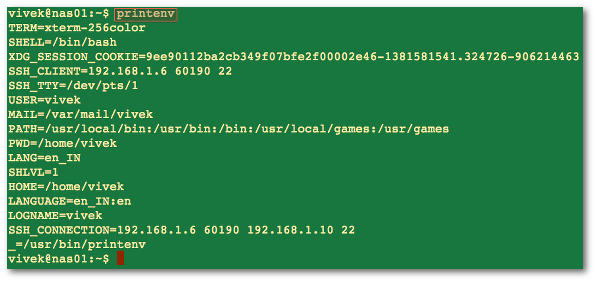
Sample outputs:
Fig.01: Command to see a list of all currently defined environment variables in a Linux bash terminal

A list of the commonly used variables in Linux

System VariableMeaningTo View Variable Value Type
BASH_VERSIONHolds the version of this instance of bash.echo $BASH_VERSION
HOSTNAMEThe name of the your computer.echo $HOSTNAME
CDPATHThe search path for the cd command.echo $CDPATH
HISTFILEThe name of the file in which command history is saved.echo $HISTFILE
HISTFILESIZEThe maximum number of lines contained in the history file.echo $HISTFILESIZE
HISTSIZEThe number of commands to remember in the command history. The default value is 500.echo $HISTSIZE
HOMEThe home directory of the current user.echo $HOME
IFSThe Internal Field Separator that is used for word splitting after expansion and to split lines into words with
the read builtin command. The default value is <space><tab><newline>.
echo $IFS
LANGUsed to determine the locale category for any category not specifically selected with a variable starting with LC_.echo $LANG
PATHThe search path for commands. It is a colon-separated list of directories in which the shell looks for commands.echo $PATH
PS1Your prompt settings.echo $PS1
TMOUTThe default timeout for the read builtin command. Also in an interactive shell, the value is interpreted as
the number of seconds to wait for input after issuing the command. If not input provided it will logout user.
echo $TMOUT
TERMYour login terminal type.echo $TERM
export TERM=vt100
SHELLSet path to login shell.echo $SHELL
DISPLAYSet X display nameecho $DISPLAY
export DISPLAY=:0.1
EDITORSet name of default text editor.export EDITOR=/usr/bin/vim

set and env command

You can use the env / set command too:
 
env
env | more
set
set | more
 
Sample outputs:
HOME=/home/vivek
vivek@nas01:~$ env
TERM=xterm-256color
SHELL=/bin/bash
XDG_SESSION_COOKIE=9ee90112ba2cb349f07bfe2f00002e46-1381581541.324726-906214463
SSH_CLIENT=192.168.1.6 60190 22
SSH_TTY=/dev/pts/1
USER=vivek
MAIL=/var/mail/vivek
PATH=/usr/local/bin:/usr/bin:/bin:/usr/local/games:/usr/games
PWD=/home/vivek
LANG=en_IN
SHLVL=1
HOME=/home/vivek
LANGUAGE=en_IN:en
LOGNAME=vivek
SSH_CONNECTION=192.168.1.6 60190 192.168.1.10 22
_=/usr/bin/env

A note about env/set command

The env will only display a list of environment variables that have been exported and it will not show all bash variables. The set command allows you to change the values of shell options and set the positional parameters, or to display the names and values of shell variables. If no options or arguments are supplied, set displays the names and values of all shell variables and functions, sorted according to the current locale, in a format that may be reused as input for setting or resetting the currently-set variables. Hence, I recommend that you use printenv command to dump the list of all shell variables on screen. To save the list of all shell environment variables to a file, enter:
 
printenv > env.txt
cat env.txt
 
Use the grep command to search for particular variable:
 
printenv | grep foo
printenv | grep HOME
 
RECOMMEND READINGS
ref: http://www.cyberciti.biz/faq/linux-list-all-environment-variables-env-command/


Monday, November 17, 2014

replaceAll vào String object

// Replaces all instances of the given substring.
String.prototype.replaceAll = function(
strTarget, // The substring you want to replace
strSubString // The string you want to replace in.
){
var strText = this;
var intIndexOfMatch = strText.indexOf( strTarget );
 
// Keep looping while an instance of the target string
// still exists in the string.
while (intIndexOfMatch != -1){
// Relace out the current instance.
strText = strText.replace( strTarget, strSubString )
 
// Get the index of any next matching substring.
intIndexOfMatch = strText.indexOf( strTarget );
}
 
// Return the updated string with ALL the target strings
// replaced out with the new substring.
return( strText );
}


1
alert(myString.replaceAll('my', 'his')); //output : "his blog of his friend here".


Sunday, November 16, 2014

how to get ServletContext from jsp

JSPs in Weblogic behaves differently from Tomcat with respect to getServletContext
ServletContext sc = getServletConfig().getServletContext();

Saturday, November 15, 2014

javascript-error-uncaught-syntaxerror-unexpected-end-of-input

Add a second });.
When properly indented, your code reads
$(function() {
    $("#mewlyDiagnosed").hover(function() {
        $("#mewlyDiagnosed").animate({'height': '237px', 'top': "-75px"});
    }, function() {
        $("#mewlyDiagnosed").animate({'height': '162px', 'top': "0px"});
    });
MISSING!
You never closed the outer $(function() {.


Spring MVC ajax request with UTF 8 support

Recently for my Dropbox Writer project, I ran into a issue with transferring none English characters between server and client side. There are not a lot of solutions on the web and those solutions are very inconsistent.

Explain my situation

I created a Spring MVC project what can create text files in Dropbox. Dropbox uses UTF 8 for text encoding, thus it supports non English characters. My application uses ajax to drive rest service calls to transfer data between html based client side and spring mvc based server side. I’ve added CharacterEncodingFilter to the web.xml as following:
<filter>
    <filter-name>CharacterEncodingFilter</filter-name>
    <filter-class>org.springframework.web.filter.CharacterEncodingFilter</filter-class>
    <init-param>
        <param-name>encoding</param-name>
        <param-value>UTF-8</param-value>
    </init-param>
    <init-param>
        <param-name>forceEncoding</param-name>
        <param-value>true</param-value>
    </init-param>
</filter>

The problem

When I create a file with name contains Chinese characters, the returned file name is scrambled. The problem is my application uses @ResponseBody in my restful ajax calls to produce json data but those data is not returned in UTF 8 format.
I’ve spent sometime researching and testing a few solutions and I want to share those with you.

Solution 1

Don’t use @ResponseBody. Return void in the controller, and use HtppServletResponse to return string with valid formatting.
@RequestMapping(value = "/rest/create/document")
public void create(Document document, HttpServletRespone respone) throws UnsupportedEncodingException {
 
    Document newDocument = DocumentService.create(Document);
 
    String json = jsonSerializer.serialize(newDocument);
 
    OutputStream outputStream = respones.getOutputStream();
 
    outputStream.write(json.getBytes("UTF-8"));
 
    outputStream.close();
}
Advantage: This will always output text with correct text format, and it’s very simple to understand.
Disadvantage: Very cumbersome. You are going away from the Spring MVC model and writing directly to the HttpServlet model.

Solution 2

Return the an Response Entity object and set it’s content type.
@RequestMapping(value = "/rest/create/document")
public ResponseEntity&lt;String&gt; create(Document document, HttpServletRespone respone) 
 
   HttpHeaders responseHeaders = new HttpHeaders();
 
 responseHeaders.add("Content-Type", "text/html; charset=utf-8");
 
 Document newDocument = DocumentService.create(Document);
 
 String json = jsonSerializer.serialize(newDocument);
 
 return new ResponseEntity&lt;String&gt;(json, responseHeaders, HttpStatus.OK);
}
Better then the last solution, but you still feel there is a lot of plumbing involved.

Solution 3

This is it; this is the most elegant solution and it took me a while to figure out.
@RequestMapping(value = "/rest/create/document", produces = "text/plain;charset=UTF-8")
@ResponseBody
public String create(Document document, HttpServletRespone respone) throws UnsupportedEncodingException {
 
    Document newDocument = DocumentService.create(Document);
 
    return jsonSerializer.serialize(newDocument);
}
When I saw this solution, it blown my mind. Yes this is really that simple. There is no plumbing, you tell spring mvc directly how to return formatted text. The downside is you will always need to return UTF 8 text.